OANDA API user guide
 What are the benefits of the OANDA API?
The OANDA v20 REST API gives you programmatic control over your trading account, market data, and order execution. You can build automated strategies to place, modify, and close trades, stream real-time pricing, and extract historical candlestick data for backtesting.
What are the OANDA API types?
We offer different API interfaces designed for specific trading architectures, latency requirements, and system scales. The following list shows our API types:
-
v20 REST API: A language-agnostic, stateless interface utilizing HTTP and JSON, accessible online across all operating systems for web, mobile, desktop, and third-party or personal applications.
-
FIX API: A stateful, text-based protocol running on TCP/FIX that is restricted to institutional customers through customer support assessment.
-
MT4: A downloadable, Windows-only software interface utilizing MQL4 and DLLs with a proprietary communication protocol for personal use applications.
For more information, refer to this page.
Which account types can be used with the OANDA v20 REST API?
You can use only v20 and MT4 v20 accounts with theOANDA v20 REST API.
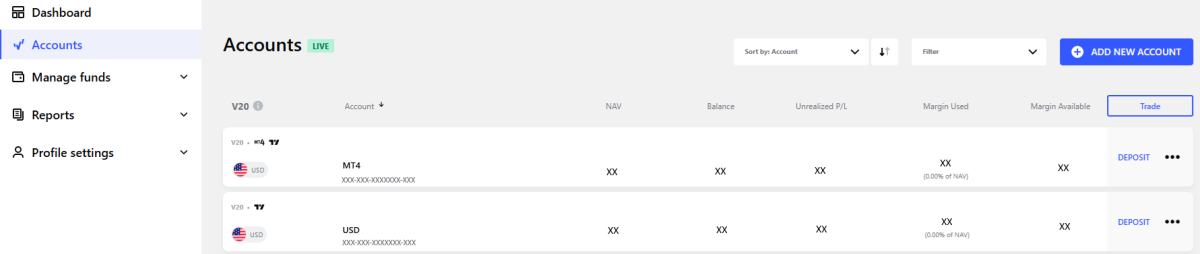
To check your account type, follow these steps:
-
Log in to the HUB.
-
From the Accounts section, you can use any account listed below V20 that has a dash-delimited number with 19 digits.
How to generate your API token
-
Log in to the HUB.
-
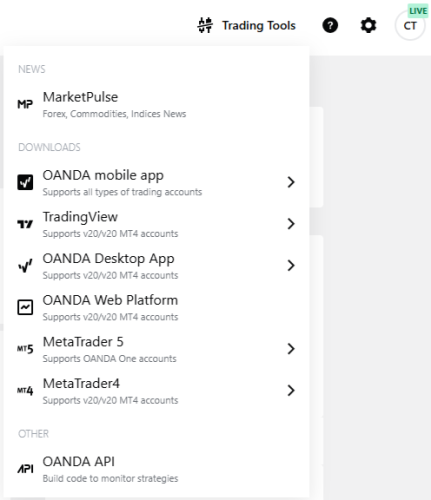
In the top-right corner, click on Trading Tools and then on OANDA API.
-
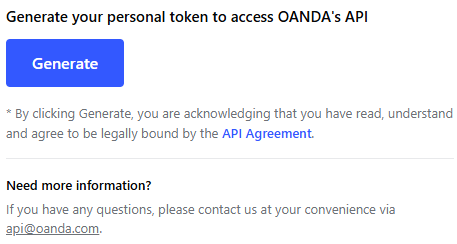
Click on Generate.
-
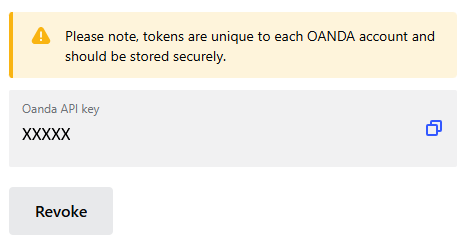
Copy your API token.
-
Copy your API token immediately and store it in a secure location. For security purposes, your token is only displayed once.
-
For a live and demo account, you need to generate a separate API token.
-
If you add or create an additional account, you need to revoke your current API token and generate a new one to access the new account through the v20 REST API. Existing tokens do not automatically inherit permissions for newly created accounts.
-
Your OANDA API token grants direct access to your trading accounts and capital. Treat it with the same confidentiality as your OANDA account password.
-
If you suspect your API token has been leaked or you have lost it, revoke it immediately and generate a new one. Our Customer Experience team cannot do that for you.
-
How to revoke your API access token
-
Log in to the HUB.
-
In the top-right corner, click on Trading Tools and then on OANDA API.
-
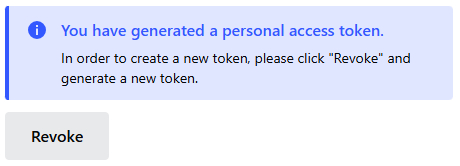
Click on Revoke.
How to create code to communicate via the OANDA API
The OANDA v20 REST API provides programmatic access to your account(s) using standard HTTPS requests, allowing you to develop custom trading systems in any programming language.
Getting started with custom code
To build custom applications that interact with the OANDA v20 REST API, review the following development guidelines and technical requirements:
-
Language agnostic: You can write code in any programming language that supports standard HTTPS requests, such as Python, JavaScript, Java, or C#.
-
Python usage: Python is the most popular programming language used by OANDA clients, although it is not necessarily the simplest language for complete beginners.
-
Unix (curl) examples: Official documentation examples are written using Unix command-line commands because they provide the simplest, most direct representation of REST API requests.
-
Sample code and libraries: The developer documentation provides sample code that illustrates the necessary libraries to import for connecting and sending requests.
-
Terminal vs. browser URLs: API host URLs are designed exclusively for terminal windows and custom code environments. This means they do not open in a standard web browser.
-
Educational resources: Free tutorials and lessons are available online to learn Python or Unix. We provide API technical documentation, but we do not teach programming fundamentals or recommend trading strategies.
-
Request payloads (body): A payload is JSON-formatted data sent inside an HTTP request to provide parameters to the server.
GETrequests do not include a payload, as all query parameters (such asgranularity,count, orfrom/todates) must be passed directly in the URL query string.POSTandPUTrequests typically require a JSON payload to send order parameters, update trade settings, or close positions (though specific endpoints likePUT .../cancelrequire no payload body). -
Content-type header: When sending requests that contain a body (
POSTandPUT), you must include the-H "Content-Type: application/json"header to instruct the OANDA server to interpret the incoming data as JSON. Omitting this header will result in an error.
Development progression by experience level
We provide documentation resources tailored to developers at each stage of technical capability.
-
Beginner developers: Use the Unix (
curl) sample code as clear, copy-and-paste templates to properly format your command lines and token authentication. Note platform boundaries such as the lack of direct REST connectivity to MT4, MT5, or TradingView desktop environments and the requirement for a v20 or MT4 v20 account. -
Intermediate developers: Reference the code endpoints such as account endpoints or pricing endpoints and definitions such as instrument definitions or primitives definitions. They describe system acceptance criteria, error conditions, candle time intervals, and order execution events (for example, reasons for a cancelled stop loss).
We no longer offer the orderbook endpoints. -
Expert developers: You can develop automated trading algorithms and indicators (such as moving average trend filters combined with conditional
IF X do Y, IF NOT X do Zlogic). You can also stream market data to CSV files or plot custom charts in external tools.
Troubleshooting
For help with errors, review our troubleshooting guide.
What are the OANDA API environment endpoints and their URLs?
REST API
-
Practice: https://api-fxpractice.oanda.com
-
Live: https://api-fxtrade.oanda.com
Streaming API
-
Practice: https://stream-fxpractice.oanda.com
-
Live: https://stream-fxtrade.oanda.com
For more information, refer to this page.
How to authenticate requests with the API token
Every time you send API requests, you need to authenticate them. To do that, pass your API key in the standard HTTP Authorization request header using the Bearer token scheme.
Refer to the following request example:
curl \
-H "Content-Type: application/json" \
-H "Authorization: Bearer <YOUR_API_TOKEN>" \
"https://api-fxtrade.oanda.com/v3/accounts/<YOUR_ACCOUNT_ID>/orders?instrument=EUR_USD"
How to find the account ID parameter
The account ID (accountID) is the unique identifier required for nearly all API endpoints, scripts, or third-party settings. (e.g., /v3/accounts/{accountID}/orders).
To find the account ID parameter, select one of the following options and follow the steps:
The HUB
-
Log in to the HUB.
-
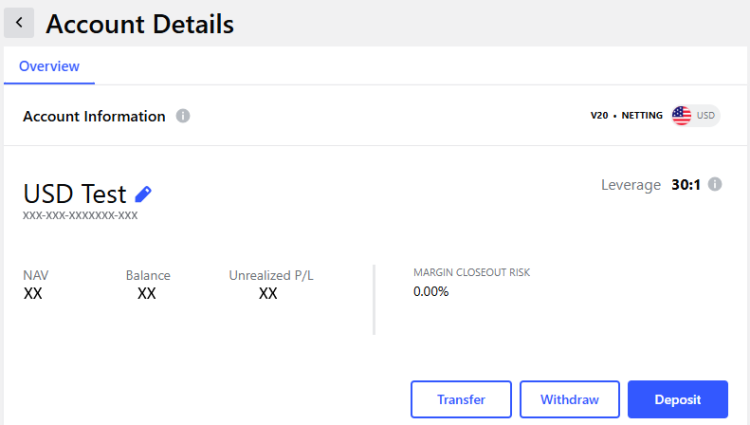
From the Accounts section, click on the desired account.
-
Copy the full dash-delimited number displayed beneath the account nickname (e.g., XXX-XXX-XXXXXXX-XXX) and pass it as
{accountID}.
OANDA v20 REST API
-
Submit a
GETrequest to/v3/accountsto receive a list of account ID parameters for all your accounts authorized for the API token.-
The following list shows the required query parameter:
-
<YOUR_API_TOKEN>: The API key you have generated.
-
-
Refer to the following request example:
curl \-H "Content-Type: application/json" \-H "Authorization: Bearer <YOUR_API_TOKEN>" \"https://api-fxtrade.oanda.com/v3/accounts"For demo accounts, remember to use the OANDA REST API practice URL and the API token generated for the demo account.
-
How to retrieve historical OHLC candle data
To extract historical open, high, low, and close candlestick bars, use the account-specific pricing endpoint. Submit a GET request to /v3/accounts/{accountID}/instruments/{instrument}/candles. The following list shows the key required query parameters:
-
<YOUR_API_TOKEN>: The API key you have generated. -
<YOUR_ACCOUNT_ID>: Your account’s unique identifier. -
granularity: The timeframe for each candle (e.g.,M1for 1-minute,M5for 5-minute,H1for 1-hour,Dfor daily). -
price: Which pricing components to return (Mfor midpoint,Bfor bid,Afor ask, or combinations likeMBA). -
fromandto: Use RFC3339-formatted timestamps (UTC) to fetch data for a specific past date and time window (e.g., from=2026-10-15T08:00:00Z). -
count: The number of candles to return (maximum 5,000 per request). If you provide bothfromandtoparameters, omitcount.
Refer to the following request example:
curl \
-H "Content-Type: application/json" \
-H "Authorization: Bearer <YOUR_API_TOKEN>" \
"https://api-fxtrade.oanda.com/v3/accounts/<YOUR_ACCOUNT_ID>/instruments/EUR_USD/candles?granularity=H1&from=2026-10-15T08:00:00Z&to=2026-10-15T09:00:00Z&price=M"
For more information, refer to this page.
How to connect the OANDA API to third-party platforms
Many third-party platforms (for example, TradeSync) require direct API bridging. To do that, follow these steps:
-
Obtain the required values:
-
Configure the third-party UI:
-
Paste the token into the API key / bearer token field.
-
Paste your account ID into the account number / ID field.
-
Select Practice/Demo or Live from the environment / server dropdown, or paste the base URL into the server / host URL field.
-
What are the rate limits and enterprise policies?
To safeguard our platform stability, we apply the following execution quotas:
-
REST API limits: Maximum 120 requests per second per IP address. Exceeding this quota triggers an
HTTP 429 (Too Many Requests)response. -
Streaming API limits: Maximum of 20 active streaming connections per IP address. Requests exceeding 20 open streams are rejected automatically.
-
Connection throttling: No more than 2 new TCP/SSL connections per second. Use persistent connections (
Connection: Keep-Alive) to bundle multiple API requests across a single session. For more information on making persistent connections, refer to this page. -
Commercial and institutional usage: If your strategy, execution engine, or multi-user architecture requires dedicated feeds or higher throughput, refer to this page.
