How to create and activate the OANDA One account
 What is an OANDA One sub-account?
OANDA account holders can have multiple sub-accounts for different purposes. For example, you can have a v20 account to trade on our proprietary OANDA platforms. You can have a v20 MT4 account to trade on our OANDA platforms as well as the MT4 platform. Similarly, you can use the OANDA One account to trade on the OANDA mobile app and MT5 platform. You cannot use the OANDA One sub-account to trade on OANDA desktop or web platforms.
Trading functionality for most of our products is enabled by default on the OANDA One account.
Do I have to create an OANDA One sub-account?
-
You will notice a message that prompts you to create an OANDA One sub-account. Click on Create Account, as shown in the following image:

-
Select your currency.
-
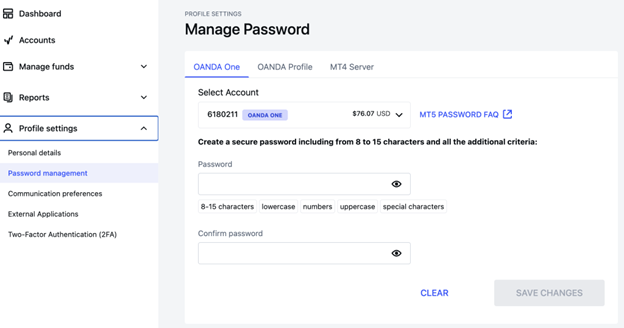
Create a password for your new OANDA One sub-account. This password will be required for trading on MT5 platforms.
If you would like to change your OANDA One password login to HUB, go to Manage password on the left menu, select the OANDA One tab and set the password.
-
You may create additional OANDA One sub-accounts in the following currencies: SGD, USD, GBP and AUD. You can have a maximum of 3 OANDA One accounts.
You can create OANDA One demo sub-accounts only in SGD
How to trade on the OANDA One sub-account
You can choose to trade on one of these platforms:
-
OANDA mobile app. To learn more, refer to our app user guide.
-
MT5 platform. To learn more, refer to our MT5 user guide.
-
TradingView. To learn more, refer to our TradingView guide.
You cannot trade on OANDA One demo sub-accounts in TradingView.
How to activate more instruments on your OANDA One sub-account
-
In the HUB as well as OANDA mobile app, you will notice a message that prompts you to upgrade your OANDA One sub-account for trading Share CFDs. Click on Start now.

-
Next, complete the market declaration and tax declaration forms. For more information, refer to our tax declaration FAQ.
-
After we review the information (usually within 5 mins), if your account is approved, the Share CFDs trading enabled - Step 3 will be marked as completed, as shown in the following image:
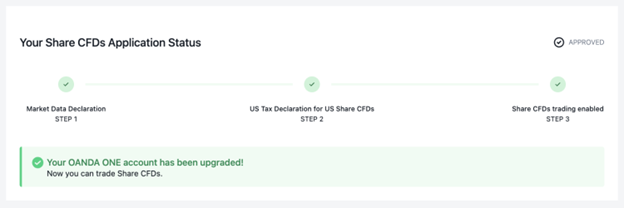
In some cases, the application may require further review, if we require additional information, we will contact you. On average, it will take up to two business days from the time you submit your tax declaration. We will send you an email when the account is approved for trading Share CFDs.
-
Once approved, we will upgrade your OANDA One sub-account. Log out and log back in on our mobile app or the MT5 platforms. You will notice Share CFDs listed and available for trading on the OANDA One sub-accounts.