How to deposit funds
 Using the HUB
-
Log in to the HUB.
-
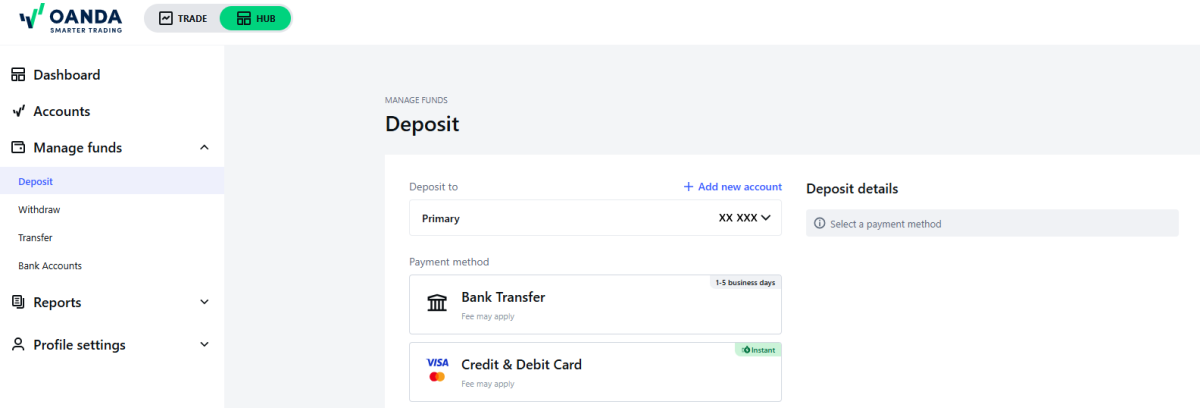
Go to Manage funds, click on Deposit and select the trading account you want to deposit to.
-
Select the payment method. Depending on the payment method you select, you will be presented with different options.
-
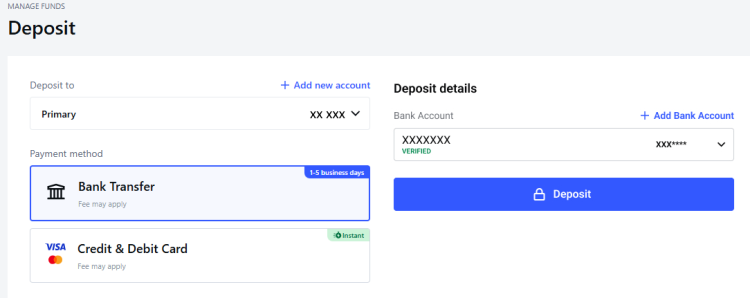
For bank transfers, we provide on-screen instructions. Bank transfers cannot be initiated within the HUB. Instead, select your existing verified bank account or add a new one to retrieve your transfer details and then complete the transaction through your bank's online website or mobile app. You can also print the transfer details and take them to your local bank branch to initiate the transfer.
-
For debit/credit cards, enter your deposit amount, select your card, or add a new one, and complete the process with a confirmation.
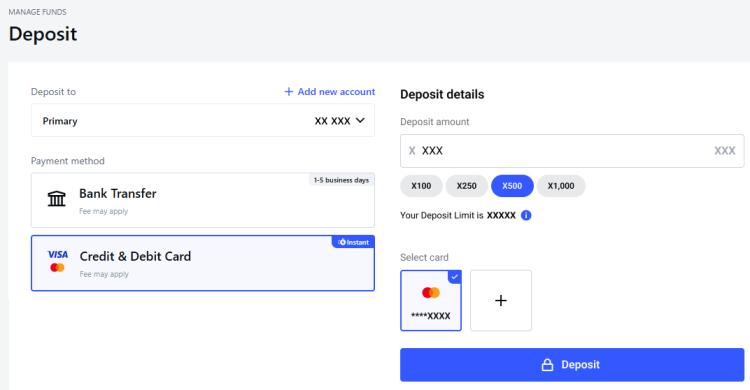
Note the on-screen information for the Deposit Limit. Your deposit limit is determined by factors such as the financial information you provided to us at the time of registration or during your most recent PIU (personal information update). The deposit limit indicates the maximum net amount across all your accounts.
- Your deposit limit, along with your total deposits and withdrawals since registration or since the last PIU, determines your deposit allowance. Deposit allowance is how much more you can deposit.
- For example, you registered with us and you have not done any PIU update since. Your deposit limit is $1000. Your total deposit since registration is $500. Your total withdrawal since registration is $200. Your deposit allowance would be $1000 - ($500 - $200) = $700.
- If your financial information has changed, you are encouraged to do a PIU update.
-
Using the OANDA mobile app
Take one of the following steps:
-
Go to More and click on Add Funds or
-
Go to the profile icon in the top bar, select the sub-account you want to transfer funds to and then click on Add Funds.
You will notice the same deposit methods as explained in the Using the HUB section. Follow the prompts to complete the process.