 How to deposit funds
-
Log in to the OANDA Portal.
-
Click on Fund Account in the top-right corner. Alternatively, you can click on TRANSFERS in the top-left corner.

-
Select one of the following deposit methods and follow the steps:
Credit Card/Debit Card/Alternate Payments-
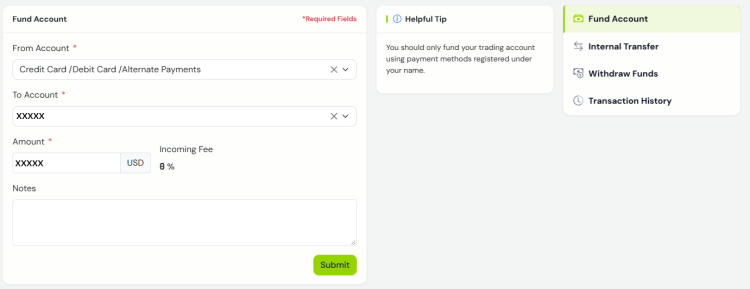
Select Credit Card / Debit Card / Alternate Payments via the drop-down menu under From Account.
-
Select your account via the drop-down menu under To Account.
-
Enter the desired deposit amount.
-
Click on Submit.
-
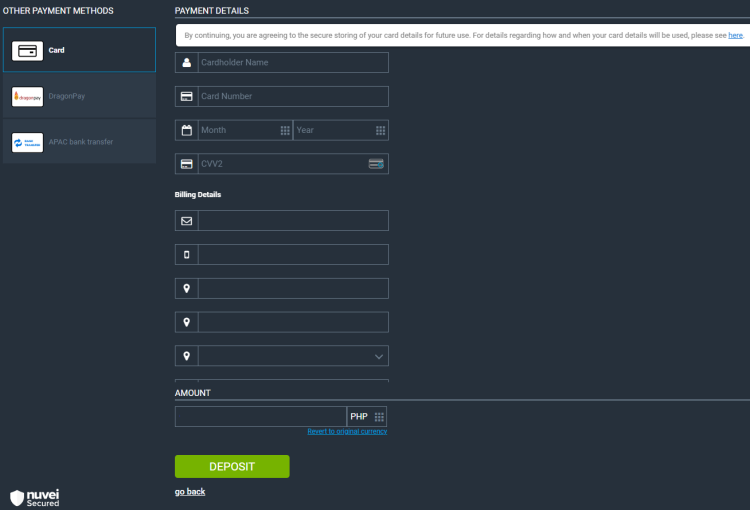
In the new window, select your desired method on the left and enter the payment details.
-
Click on DEPOSIT.
Neteller/Skrill-
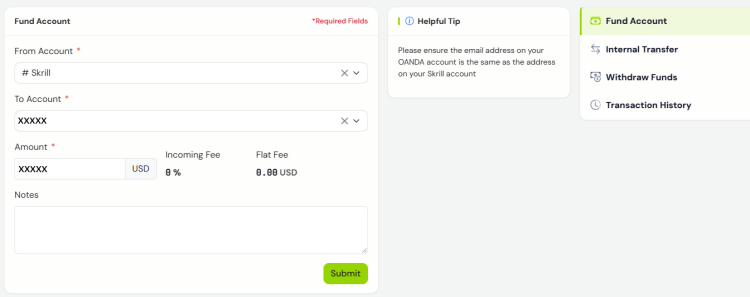
Select Neteller / Skrill via the drop-down menu under From Account.
-
Select your account via the drop-down menu under To Account.
Ensure the email address on your OANDA account is the same as the address on your Neteller or Skrill account.For the Neteller method, enter your Neteller member email address. -
Enter the desired deposit amount.
-
Click on Submit.
-
Follow the instructions on the new page to finish the deposit.
Bank Transfer (WIRE or WISE DEPOSIT)-
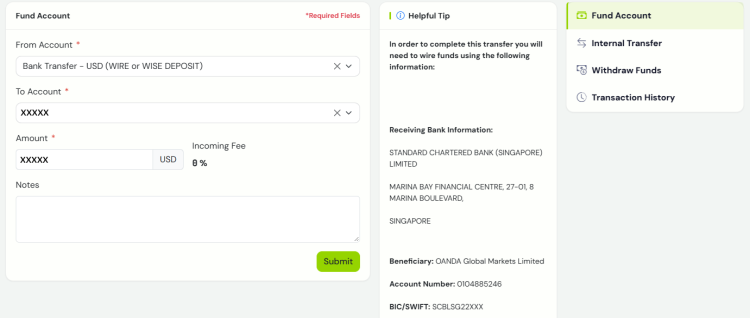
Select Bank Transfer (WIRE or WISE DEPOSIT) in the desired deposit currency (for example, if you want to deposit in USD, select Bank Transfer - USD (WIRE or WISE DEPOSIT) via the drop-down menu under From Account).
-
Select your account via the drop-down menu under To Account.
The currency in From Account must match the currency in To Account to successfully begin the payment process. -
Enter the desired deposit amount.
-
Click on Submit.
-
Complete the bank transfer by using the information shown on the right side under the Helpful Tip section.
Online Bank Transfers - Latin America-
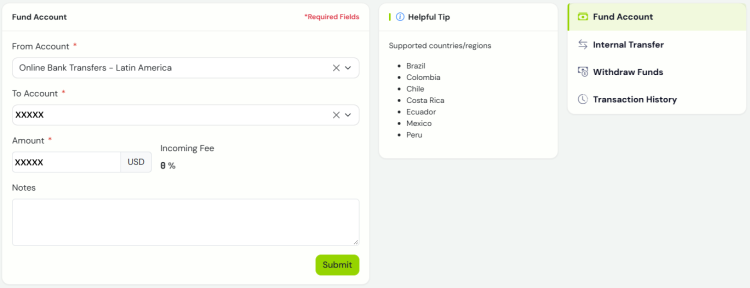
Select Online Bank Transfers - Latin America via the drop-down menu under From Account.
For this deposit method, we support the following countries:Brazil
Colombia
Chile
Costa Rica
Ecuador
Mexico
Peru
-
Select your account via the drop-down menu under To Account.
-
Enter the desired deposit amount.
-
Click on Submit.
-
Follow the instructions on the new page to finish the deposit.
Online Bank Transfers - South East Asia-
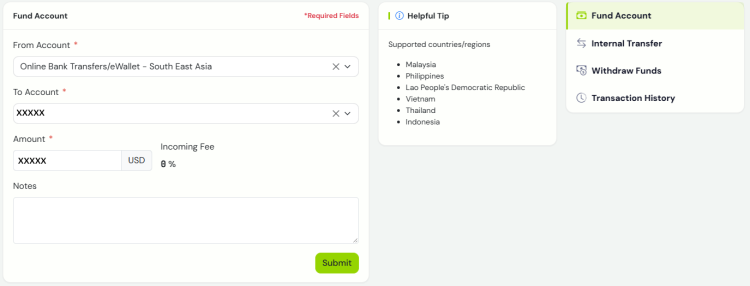
Select Online Bank Transfers/eWallet - South East Asia via the drop-down menu under From Account.
For this deposit method, we support the following countries:Malaysia
Philippines
Lao People's Democratic Republic
Vietnam
Thailand
Indonesia
-
Select your account via the drop-down menu under To Account.
-
Enter the desired deposit amount.
-
Click on Submit.
-
Follow the instructions on the new page to finish the deposit.
Online Bank Transfers/Mobile Transfer - South Africa/Kenya-
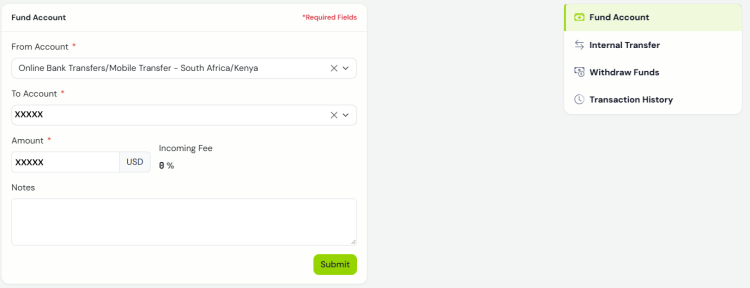
Select nline Bank Transfers/Mobile Transfer - South Africa/Kenya via the drop-down menu under From Account.
-
Select your account via the drop-down menu under To Account.
-
Enter the desired deposit amount.
-
Click on Submit.
-
Follow the instructions on the new page to finish the deposit.
-
What are the available deposit methods?
Credit/debit card
| Minimum deposit | Average processing time | Our fees | Notes |
|---|---|---|---|
| None | Immediate | No fees | Your debit card or credit card provider may charge you a service fee |
- We cannot accept prepaid cards.
- We cannot accept card deposits from Israel.
Alternate Payments
| Minimum deposit | Average processing time | Our fees | Notes |
|---|---|---|---|
| Depends on the country and currency. | 3 to 5 business days | No fees | Payment instructions are provided in your account on the OANDA Portal. |
Neteller
| Minimum deposit | Average processing time | Our fees | Notes |
|---|---|---|---|
| None | Up to 1 business day | No fees | Your name and email address on your account must match those on your OANDA account. |
- Neteller may charge you a service fee
- Neteller members must be fully verified to be able to make a successful payment
- Neteller corporate payments are not allowed
- Neteller payments must not originate from a prepaid card.
Skrill
| Minimum deposit | Average processing times | Our fees | Notes |
|---|---|---|---|
| None | Up to 1 business day | No fees | Your name and email address on your account must match those on your OANDA account. |
- Skrill may charge you a service fee
- Skrill members must be fully verified to be able to make a successful payment
- Skrill corporate payments are not allowed
- Skrill payments must not originate from a prepaid card.
Bank transfer
| Minimum deposit | Average processing time | Our fees | Notes |
|---|---|---|---|
| None | 3 to 5 business days | No fees |
|
- Your bank may charge a service fee.
WISE
What should I keep in mind before depositing funds?
-
WISE deposits are treated as any other bank transfer. When you want to withdraw funds deposited via WISE, our hierarchy rules and all other standard withdrawal rules apply.
-
We accept deposits from WISE only if you have submitted identity and proof of identity and address documents at the registration time. If not submitted yet, we encourage you to proactively email us the required documents listed in this topic.
-
For first-time WISE deposits, follow these steps:
-
Add WISE as a funding source in the OANDA Portal:
-
Ensure you enter WISE in the Bank Name section and enter all related WISE information.
-
Download a PDF statement from your WISE account and upload it in the UPLOAD BANK STATEMENT section.
The statement must show the following details:
-
Your full name (must match the OANDA account holder's name).
-
Your WISE account number (at least the last four digits).
-
The WISE logo or its name.
-
The statement must be in an uncropped PDF issued within the last 3 months.
-
-
If your name or account number changes in the future, we will need a transaction confirmation again for future WISE deposits.
-
-
-
After successfully completing all the required steps, your funds will arrive in your OANDA account within 1 business day.
-
If we need additional documents from you, we will email you. This means that the processing time may take longer.
How to deposit funds
-
Add funds to your WISE wallet.
-
Deposit your funds to your OANDA account.
When asked who are you sending money to, select New Contact > Business or Charity. For the email address, enter ogmsales@oanda.com. Then, enter OANDA’s bank account details after completing these steps.For instructions on how to perform the above actions from the WISE side, visit the WISE Help Portal.
Online Bank Transfers
| Minimum deposit | Average processing times | Our fees | Notes |
|---|---|---|---|
| None | 3 to 5 business days | No fees | Payment instructions are provided in your account on the OANDA Portal. |
- A payment provider may charge a service fee.
Notes
-
We cannot accept payments from third parties. Ensure that the name on the account from which your funds arrive matches that on your OANDA account. For your security, you can only withdraw funds by the same method and in the same currency that you used to deposit them.
-
We do not make cross-border withdrawals. Funds arriving from one country must be returned to the source in that same country.
-
Deposit requests for more than 9,000 USD will be restricted if you have not provided the required documentation.
-
If you cannot see any options to add funds in the Fund Account tab in the OANDA Portal, it might mean that your account is restricted due to outdated personal information. In such a case, update your personal information. If that does not resolve the issue, contact our Customer Experience team.